Deny/Lost Reservations
Report parameters
|
Field |
Description |
|---|---|
|
Report Name |
The name of the report. |
|
Start Date |
The start date from when the data must be considered for generating the report. |
|
End Date |
The end date until when the data must be considered for generating the report. |
|
Report Options |
Available options include the following:
|
|
Sort Options |
Available options include the following:
|
|
Summary Only |
When enabled, the system includes only the summary details of deny/lost reservations in the report. |
Sample Report
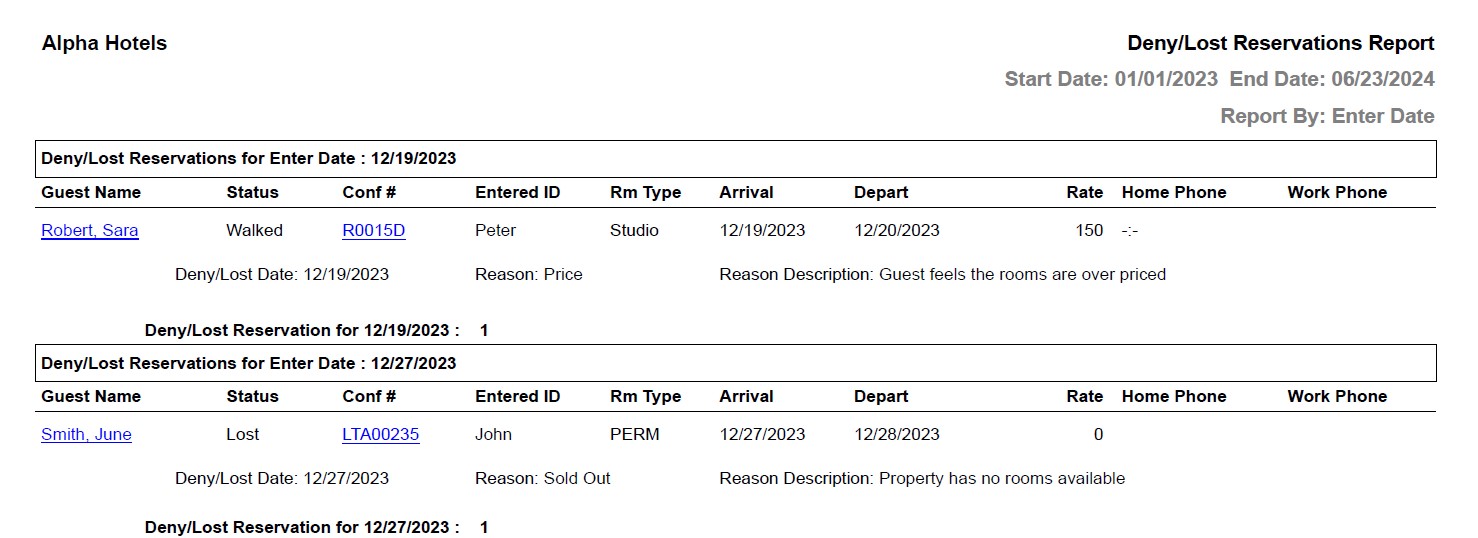
Report Fields
|
Field |
Description |
|---|---|
|
Guest Name |
The last name and first name of the guest added to the reservation will appear as a hyperlink and clicking it will navigate the user to the guest record. |
|
Status |
The status of the reservation whether it is denied or lost to a competitor. |
|
Conf # |
The confirmation number of the reservation will appear as a hyperlink and clicking it will navigate the user to the reservation record. |
|
Entered ID |
The identification number of the user associated with this lost business. |
|
Rm Type |
The type of room the guest requested. |
|
Arrival |
The date of arrival of the guest. |
|
Depart |
The date of departure of the guest. |
|
Rate |
The rate defined for the selected room type. |
|
Home Phone |
The home phone number of the guest. |
|
Work Phone |
The work phone number of the guest. |
|
Deny/Lost Date |
The date the reservation was lost. |
|
Reason |
The reason entered by the user for the lost business. |
|
Reason Description |
The description of the lost business. |